Saturday, September 2, 2017

Extended LEGO Club with Maker Fun

The Standard
The library had an extremely popular weekly LEGO Club for kids 5 to 12 (we have extra large building bricks in the children's room out all the time for younger kids). There was a large assortment of regular pieces, boards, minifigures, and a ton of random little accessories. People might tell you that you should steer away from sets and kits and stick to the plain pieces, but it's not true. The kids love the little flames, swords, flowers, and all kinds of bits that they use to create mini kingdoms and scenes. My supervisor use to go to a LEGO store that had a fill-a-bag section and would just add all kinds of things. As our minifigures walked out over the course of the years I was there (especially the female minifigures), I budgeted in two sets from LEGO Education- this community set and a fantasy one. I found these sets to be the best price for the largest number of figures. I also added a bunch of 10X10 plates, the kids liked to add them together to expand and we had a limited number, these I just got from Amazon. When the kids came in they'd choose their plates and minifigures, which were carefully rationed before we got the new sets. Then they'd find a spot around a table set with gladware bowls full of regular pieces and large plates heaped with accessories, for easier digging. Anything in a bowl or plate is fair game, if it's on the table in front of someone it's  been spoken for and you have to ask if they will trade. At the end we put each child's creation in our lighted display case for the week with a post-it or card with their name on it. They love showing their parents and friends throughout the week.
With very few exceptions, I didn't set themes or parameters for the kids, they all had different interests and things they wanted to build and I felt it was important for them to have some unrestrained creative time. This social media ad shows a couple incredible dynamic scenes the kids came up with one week:
I sometimes had teen volunteers help me with LEGO club and while it was under my main umbrella focus, part time employees tended to run it most of the time after I'd been there a few months. A few hours before the program time I'd take the creations out of the display and take them apart, separating out the regular pieces from the accessories and the minifigures. I once took apart a small constructed box in a scene, when I opened it there was a disembodied minifigure head with a small red single cap piece on the neck, I have no idea which kid made it, but it's one of my top ten LEGO club memories. 

Extended Version
When LEGO club falls during a school vacation or an early dismissal we would extend it to two hours and add some maker activities. LEGOs were still the most popular by far but we managed to get some to expand. Here are some of the other stations:

LEGO Catapults-
These were my first addition. I will admit I held the minifigures hostage to encourage the kids to try something new, if you wanted a guy you had to at least try to make it fly. There were to approaches to making them, one was a simple lever on an wheely base, and the other involved small rubber bands and was a bit harder to make work. I covered a table in paper to let us track and measure their efforts. 

Geodesic Building
This one became extremely popular and a regular fixture of Extended LEGO club. I added it because kids + snacks is a no-brainer. It's pretty simple: edible joints connect toothpicks to make pyramids, towers, and domes. The first time I used hard gummy pumpkins, because it was Thanksgiving. These worked well but were heavy and not very tasty. We also used grapes, which worked the best and healthy, but were expensive. We tried cheese sticks broken up into cubes, they didn't work at all, they got too soft too quickly. In the end, our tried and true choice was mini marshmallows. They're very cheap and work perfectly. Each child gets a plate, a pile of toothpicks (around 25), and about a 1/3 cup of marshmallows. They're welcome to eat their building materials, but they have to build at least one thing first. 
k'nex
Someone donated a huge box of these next-level building toys to the library. We set them out and just let the kids do whatever they want. They're a bit harder to put together than LEGOs and take some more patience. They like that they can make creations that move and we also have two motors that take a lot of trial-and-error to make work but are popular too. 


Tech Make Night with iPads

I've had a number of programs for kids 5 to tweens using iPad apps for making. Most of the programs I've used are free. I usually had one app that I was demo-ing and pointing out to them  but I let them play with other apps as well. I'd help them out when needed but encouraged them to try to figure out as much as they could. I didn't pressure them to create a finished product. I've always felt that what most kids (and people in general) want is to make themselves heard, to tell their stories. I truly feel that tablet apps can offer them new tools to create their own worlds and share them. 
 
GarageBand- 
This app comes with the iPad. Don't be afraid to introduce kids to this powerful app, there are lots of smart functions that allow for messing around without having to understand all of the mixing functions. When you add an instrument to your mix there are a number of options to spin through, the ones with gears around them offer small pre-made loops that are easy to put together. There are a lot of YouTube tutorials you can watch but messing around yourself for half an hour or so will show you a lot. I like to suggest kids start with the smart drums, it's very easy to understand and lets you layer a lot of instruments together with immediate impact. Your instruments come from the specific drum kit you choose. Then you just drag the icons over to the grid, farther to the left is a simpler beat, towards the top is loud, and vice versa. When you have the combination you like best, just hit the record button to add it to your song. 

Kids also love recording their own voices and playing with these different filters-

The kids never really came up with finished songs, but the beauty of open-ended maker programs in the library is it lets them play around and explore without any expectations. 

This is a very silly app. It uses simple drag and drop and record functions to let kids make their own little animations, similar to the JibJab videos from a few years ago, with 2-d images that break apart at the mouth to talk. They have a lot of educational historical figures as well as archetypes like ballerinas or cowboys. They also let you make your own characters using photos or drawings. The kids I've seen really run with this one, coming back month after month to keep using the same iPad and building on their gallery, have used this function. They draw their own backgrounds and come up with elaborate skits. I've seen kids as young as 6 and as old as 11 have a ball with it. 

I have a background in independent film, so I really liked being able to give some film tools to kids. I've used a few different apps over the years, they all generally work the same way. It can take some time for kids to start to see their work turning into an actual film, but I've seen a lot of kids stick with it. I would put out LEGO guys, boards, and a small assortment of accessories, as well as our misc. felt board toys that have been orphaned from their original sets. I also opened up the storytime closets to let them use other stuffed toys, rubber ducks, etc... Here are a few of my favorite kid flicks from programs: 


That last one, the pool, is my favorite, it's so creative and embraces all of the opportunities offered by the minifigures. It truly blows me away.  All of these were made in a single 60 minute session. 

You can take these creations to the next level by combining garageband and stop motion films with iMovie, making your own soundtracks, effects and cutting together longer projects. This would work best for older kids but I would say kids as young as 7 or 8 could manage it as well. Like Garageband, iMovie comes with the iPad and is close to a professional-level app, but you can easily pick up a few functions to start making simple films. 

April Showers Bring ZAP!

I was able to bring in a wonderful STEM educator from a local private school for a special program on electricity. While trying to come up with an interesting electricity program for Benjamin Franklin's birthday in January I found a number of experiments using a large static-electricity producing machine called the Van de Graaf generator. You might have played with one at a science museum or in science class. I looked around to see if I could rent one or have an organization bring one to the library for a modest price. By putting out my search at a staff meeting I found out that a local private school that one of our branch manager's kids attended had one. Even better, the STEM educator there had a relationship with our library. She was happy to spend her Saturday sharing her school's resources with our kids. It ended up taking us a while to arrange the program and I ended up holding it in April.

She brought all of her own materials for experiments with the generator and two additional experiments. One simply involved wires, batteries, and small lightbulbs, encouraging the children to experiment with circuits.


We had several parents and kids try out the generator with hair-raising results. Fine, light hair reacts most visibly, so be aware that not everyone will end up with their hair sticking up. But you still feel the current through your body. The teacher was well versed on the safety measures and made sure everyone practiced them, there were no injuries. She just used a regular outlet for the generator.

This program had some of my favorite elements: free, STEM, and bringing an unusual experience to the library. It was also very light on using library resources, including supplies and my time for planning/set-up.

Wednesday, May 24, 2017

Cardboard Play Structures

I'm a big fan of Mr. McGroovy's box rivets, they let you make all different sizes of cardboard creations without needing all giant appliance boxes. I think the biggest of any of the boxes below was 2ft x 4ft. The rivets are reusable, though I'd say about 60% of the ones I try to pull apart do so without breaking. Still, a single $20 box of them has gotten us through 4 different builds.  I use a sharpish phillips-head screwdriver to make the holes in the boxes for the rivets. I find it makes the most secure structures if you use multiple layers of cardboard. The first  build with our set was a gingerbread house that my supervisor made. Next I created a Magic Tree House for a program to mark the author's birthday. I wanted to get some height so I stacked up a number of pallets I found in the basement, including a handy plywood platform that made it so kids wouldn't fall through the slats. That ended up being played in and loved for about three months. The tree was something a coworker had made as a thankful tree for thanksgiving. During my program the kids made "boards" and leaves to decorate it.
At some point the roof caved in and I took it off, I was suddenly deluged with dozens of concerned  kids begging me not to take it down. Instead we decided to just keep going and I made this pirate ship. I know, it looks a bit like a tugboat, but the flag and figurehead made by our ace artist library assistant help sell it. This was also very popular but the pallets it's on were incredibly noisy, since we only had one platform and the pallets were more spread out there was a combination of individual planking and cardboard flooring to make it safer. I added some heavy duty cardboard tubes leftover from Muggle Quidditch to give the top some extra support and there's a box acting a little like a chimney in the back to further support the roof. Having something to go inside was clearly very important to them with the tree house so I needed to maintain that.  
Once the pirate ship started getting worn out my coworker requested a fire truck. We decided to scale down with it and go to just one pallet. We uncovered some old foamcore displays and used a few pieces to make flooring. Since the firetruck is smaller only small children can stand on that part and falling through the pallet slats is alleviated by the foamcore. The pièce de résistance was an old plastic tray from some long ago platter that I cut a hole in the middle of and used a rivet to attach it a small box to act as a real spinning steering wheel for the firetruck. We ended up painting the firetruck red in a program and I have to say it really didn't help it. I've heard latex paint used for interior walls is really the best to use on cardboard. We used tempera and it just ended up very transparent and kind of rusty looking. It also dampened the cardboard a lot, cutting down on the clean lines. I moved on from this position before creating another structure, I hope someone else picked up the torch because the kids really loved playing in them. 

Monday, May 22, 2017

Farm in the Library

We are extremely lucky to have a magnet school in our community that focuses on urban farming. They've been great partners for programming, whether it was lending us cornstalks for a popcorn program or bringing in different experiences for our kiddos. Here are a few of my favorite farm encounters I've been a part of:

Grow, Eat, Grow!
For the summer reading theme year that focused on health and fitness we had an outreach person from the farm come with fresh veggies, picked that morning, and seeds. We tried zucchini, yellow squash, green beans, and carrots. I made some quick cheesy zucchini in the office toaster oven, just slice it in half length-wise, brush with olive oil, sprinkle with salt, pepper, and cheese (I use parmesan for myself, mozzarella for the kids). We sat in a big circle and the kids got to hold different seeds, smell them, talk about them, and then examine the veggies. Many tried things their parents said they avoid at home. Most of the kids loved the cheesy zucchini. It was a really simple but effective program for kids of all ages.


Llama in the Library
This one wasn't with the high school, it was a local farmer that does school visits with her llamas. In the scheme of outside programs it was pretty economical and it's pretty eye-catching to have a llama in the second floor children's room. I didn't plan this one, my coworker organized it but I ended up being the one overseeing it on the day of.
A few details particularly exciting to me:
-the llama arrived in a minivan with the seats taken out, much easier to maneuver than a truck or trailer
-it wasn't used to be high up, so it spent most of the time staring out our windows at the unusual perspective of the outside
-it made this quiet humming-groaning noise the whole time
-llamas only spit at other llamas, never at humans

It was really friendly and in addition to a story, details on llama goods, passing around yarn and other items, the farmer let everyone pet the llama and take their pictures with it.


Year of the Rooster
We have these laminated cards we show the kids at class visits talking about the different kinds of programs we have. One has a picture of a chicken visiting the library. All the kids think it's awesome and from the beginning of my tenure I longed to have a chicken visit the library again. It took over a year to find just the right timing for the farm high school and the library. When I saw that this was the year of the rooster in the Chinese zodiac, I knew I had to have a rooster come to the library to celebrate the Lunar New Year. We have a high number of Chinese families that attend our programs. We had to shuffle things around last minute but managed to schedule the rooster for the last weekend of the New Year celebrations. My first question when booking the rooster was are roosters even ok to meet? Are they aggressive? I was told they can be but the one at the farm was great with kids. And was he ever! Hatched at a daycare in a nearby town that doesn't allow roosters, only hens, Gertie was used to being in a classroom setting. The outreach person from the farm talked a little about roosters and then answered a deluge of questions. Everyone got a chance to pet him and hold him if they wanted. He was very patient and beautiful.

We even had a local online news outlet there covering it. I gave out a handout with all of the Chinese Zodiac animals on it and everyone figured out there personal one. We decorated cartoon zodiac paper lanterns printed out on red paper, using pipe cleaners and gold pens, I did the cutting beforehand because it's unlucky to cut things during Lunar New Year. I had an artistic library assistant put some greetings in Chinese pictographs on the wipeboard for people to copy. It was a fun combination of animal and cultural programs.

3D Design and Printing: a New Chess Set

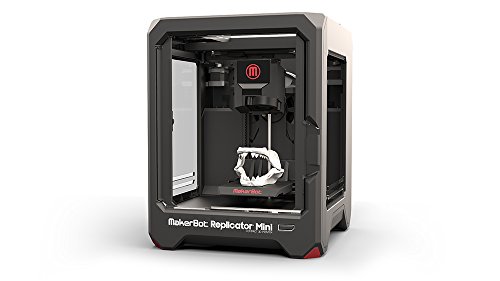
Image result for makerbot miniMy undergraduate degree is in theater design, so I actually have training in CAD, including a quarter spent learning 3DViz, a professional 3D program that architects used at the time I learned it, which was not that recently. I find it really exciting that I get to pull from that knowledge now in teaching kids 3D printing on the junior version by the same company, Tinkercad. The library system had one small Makerbot Mini that had been given to us by a grant from a local company, specifically for kids programs. Embracing our library's 3D printer was one of the things that helped me get noticed and move rapidly from part time to full time. Traditionally the elementary services librarian at my library has been the one in charge of the 3D printer and having tech classes for kids, so I knew I needed to have something great as one of my first few months of programs in that position. Previously the library had done intro classes that consisted of designing a cup and more complicated ones creating a lamp. The intro classes I ran at my branch were the basics involved in designing a house or castle. With a robust chess club as another of my main regular duties I was inspired to have the kids work together in designing a new chess set.

Rather than just make this a Tinkercad how-to I decided to really teach them about the stages of design. I booked our tech classroom and registered kids, 9 total, with a caregiver, ages 5 to 12. I called everyone two days before, got across-the-board assurances they would come and then ended up with six kids. This is why I hate registration for programs. Anyways, six was a great number. The program was 90 minutes and I broke it up into several phases: Research, Brainstorm, Design, and Re-design.

Research
I started by showing them some images of ancient chess sets, the current standard set (called the Staunton chess set) and the images from Elgin marbles and architecture in London that inspired its designer in the 1800's in London. I talked about how the designer was inspired by his city. Then we took a look at some of the far-out designs for chess sets on Thingiverse.

Brainstorm
We brainstormed different visual themes for our board. Animals, fruits and tv characters made the board. I talked about the steps it takes to design complex pieces and suggested we try something a little more simple since it was most students' first attempts with Tinkercad. Since New Haven is known as Elm City and the town green is in front of the library I suggested trees as a theme. We then brainstormed some more for what each piece could be in our theme finally settling on:
Pawn- leaf
Rook- Tree Stump
Knight- Squirrel
Bishop- Christmas Tree
Queen- Birch Tree
King- Oak Tree

Design
Finally it was time to crack open Tinkercad. I showed them the basics. We divvied up the pieces, see, 6 was perfect! The kids went back to the research phase individually and looked at some pictures to help them come up with their design.Their designs were about as diverse as their age range. My plan had always been to tweak what they came up with to get our end set. 3/4s of the designs needed very few changes, two kids obviously sort of missed the boat on the concept. Many of the kids were incredibly creative, my favorite is the squirrel knight which has a 6 for a tail! Here are their designs:


Re-Design
We talked about how you don't just come up with one idea in design, toss the pieces on the workplane and it's perfect. Instead you come up with the idea and try and try and try until you find the pieces that work together best. I used my nametag as an example (it's a frame that the paper nametag that goes into our regular lanyard covers fits into), it took me several tries to get the owl right, I scrapped whole completed designs for it. We also talked about how the Makerbot Mini was created as a prototype machine, as it only uses a brittle plastic filament rather than making things out of hardier materials like metal. It's meant to test out ideas that you would then manufacture somewhere else.
I completed the main re-design of course, on my own over the next few weeks. I borrowed from Thingiverse for the rook and the king, mostly using a stump I found wholly designed for the rook but just using a more intricate oak leaf that I incorporated into a larger design for the king. I used the height for standard pieces from the chess entry on Wikipedia, even though this would never be a tournament set. I used the child's squirrel knight design with only the change of making it stand up to mimic the posture of the classic knight.
Here's the finished set, I'm pretty proud of it and the kids should be too:

Dinovember!

Inspired by the mischievous dinosaurs that visit the Tuma family in Novemeber, I threw a celebration of all things dinosaur. We made foam dinosaur foot covers, hatched dinosaur eggs, had a dinosaur count contest, and learned about how fossils are created with yummy pudding parfaits. This was my priciest program of the fall, about $60. We are fortunate to be down the street from the Yale Peabody Museum of Natural History and this was the first time we took advantage of their Peabody on the Road program. They sent two volunteer docents and two large tables-worth of hands-on exhibits from the museum. Every time I was able to sneak into the main room where they were set up the table was packed. They have four kits to choose between and had just debuted the perfect one for my program: the evolution of birds into dinosaurs.


In our program room I had four activities for the kids:

Hatching Dinosaur Eggs
I got a bag of small plastic dinosaurs from Amazon and made about 30 eggs. After much inner debate about sand-coffe-ground-etc... and all of the many recipes I found on Pinterest, I went with a simple baking soda and water recipe. I can't find my notes for the ratio I ended up with, I think it was something like 2 cups of water to 1 1/3 cups of baking soda, but I tested it at home and it was different at work. I got two five-pound bags of baking soda at Target but I only used one. You just mix them together until you get a moldable consistency. I added some green food coloring to the water but it didn't come through strongly in the final eggs. The ones I made at home hardened nicely over about three days. The ones at work (where the heat is stronger and dryer) flaked as they hardened, which made them look scaly. The kids then used toy hammers and eye droppers with vinegar to break them apart and reveal the dinosaurs inside. This was messy but really fun.

Dino-feet
I got a big pack of colored foam from Michael's and made a couple of laminated templates. We bought some tiara and pirate hat kits from Oriental Trading in October and they have provided a huge wealth of stick-on foam shapes from jewels to geometric shapes to letters. The big trick to these I only figured out from viewing a number of blogs about making them is to have the back part of the dinofoot go under the shoe, many showed these as being pulled up so it was kind of a like a huge anklet but it's hard to get a hole that will go over a shoe. The template is pretty easy but you can find a printable one here
Fossil Dig
What's a big party without a snack? These are basically dirt cups with pudding and crushed graham cracker pieces (both chocolate and regular) and a few dino gummies (again from Amazon). I had a printout that talked about how sediment forms on top of dinosaur remains to make fossils. After much math and consternation in the pudding aisle of the grocery store I realized that the single-serve snack packs were cheaper than making up a bunch of the cold instant stuff, also worked better labor-wise and to accommodate whatever level of attendance we have (always hard to gauge at my library).
Dinosaurs on the brain
The last station was just a simple game. I have a glass head I bought from Pier One Imports a few years ago (something like $15 on sale) to hold my pro headphones I use for audiobook work (if they don't stay stretched they pinch my head). I've used it a few times at the library, for a how-many-LEGOS challenge and for a mad science display. It's nice because even smarty kids or parents who try to game the guessing game can't really work with the distortion provided by the glass. I put a bunch of medium sized vinyl dinosaurs from a story time kit inside along with my leftover small plastic ones, I think it ended up being 36. I had two kids guess the right number and they got a book that had been donated to the library about dinosaurs and a little glowing plastic fossil puzzle from the dollar tree.


Here's a link to a pdf of the signs for each station (except the dino-feet, it was pretty self-explanatory)